WHY I CALL THIS ARTICLE A "CHEAT SHEETS?"
Because what I'm sharing in this article isn't official, but rather based on my own experience and research into the best way to create prompts for WAN 2.6.
I won't explain what WAN 2.6 is or what its advantages and disadvantages are, as you can find that in another article.
Okay, let's get straight to it. In this cheat sheet, I'll provide a list of what you need to change your prompt language for WAN 2.6.
THE WHY
Why Wan 2.6 is a hot topic among creators:
1. Native Audio-Visual Synchronization
Unlike previous models, which often resulted in "silent" videos and required manual sound, Wan 2.6 features Native Audio Sync. It can automatically synchronize dialogue, lip-sync, and even environmental sound effects with the movement in the video.
2. Focus on Character & Consistency (Reference-to-Video)
One of its standout features is Reference-to-Video. You can input a single character or object reference, and Wan 2.6 will maintain that character's identity across multiple scenes (multi-shots). This solves a major problem in AI video where character faces frequently change between cuts.
3. 1080p Cinematic Quality
Wan 2.6 supports resolutions up to 1080p at 30 fps. The movement is much smoother and has fewer artifacts or "flicker" compared to version 2.5. Alibaba also optimized its Diffusion Transformer (DiT) architecture to allow for longer video lengths (up to 15 seconds per generation) with a clearer narrative structure.
4. Faster & Efficient in Resource Consumption
Despite the increased quality, they have a relatively lightweight version. In fact, this model is reportedly designed to compete with Google Veo 3.1 in terms of inference speed and API cost efficiency.
THE I2V STRUCTURE
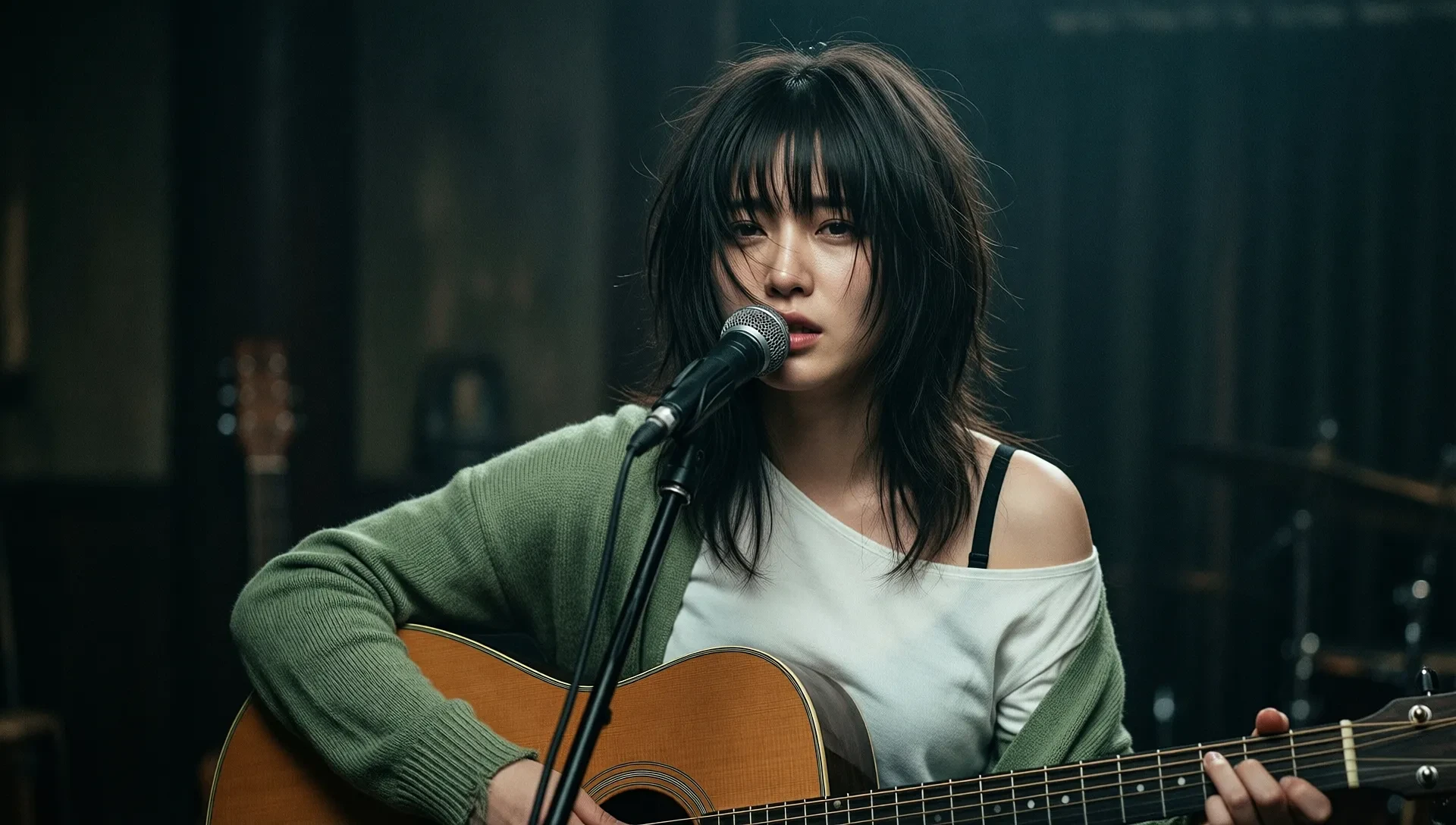
i use this image
A. The "Cinematic Physics" Structure
This package focuses on material consistency. Suitable for your Ambient Noir scenes that need detailed piano felt, flying dust, or strands of singer's hair.
Structure: [Static Frame Context] + [Motion Subject] + [Environmental FX] + [Camera Technicals] + [Audio Sync Specs] + [Quality Tags]
Sample Prompt:
[Static Frame Context]: From the provided image of the young woman with a green cardigan and messy hair, holding an acoustic guitar. [Motion Subject]: Her left hand firmly presses a Cmaj7 chord on the fretboard, while her right-hand fingers perform a delicate, slow arpeggio fingerpicking pattern. Her rises and falls gently with each breath. Her eyes blink slowly, looking down at the strings with a melancholic expression. [Environmental FX]: Subtle volumetric haze and dust motes swirl in the studio light. The warm glow of the lamp reflects off the polished guitar wood and the metallic sheen of the strings as they vibrate. [Camera Technicals]: A deliberate, ultra-slow dolly in towards her face and the guitar soundhole. Maintain a shallow depth of field with a creamy bokeh on the background drums. [Audio Sync Specs]: Audio: A dreamy folk acoustic guitar melody featuring slow, resonant fingerpicking. This is joined by a husky, breathy female vocal singing "should i chase you under the rain?" in a raspy lower register. Every finger slide on the strings produces an audible fret noise, and the resonance of the guitar body creates a warm, in-the-room feel. [Quality Tags]: Shot on Arri Alexa LF, 8K resolution, photorealistic, cinematic low-key lighting, 35mm film grain, high temporal consistency, masterpiece quality.
no need to write the [...] , its only for the structure sample
Sample Result:
B. The "Temporal Transition" Structure (Multi-Shot)
This use is to force the Wan 2.6 to make more extreme movements or change angles (but still be careful with morphing).
Structure: FLUIDIC (no fixed structure)
what you need to understand are:
1. Initial Frame Locking (Pixel Security)
The I2V model is very sensitive in the first seconds. The description "starting with the exact composition of the reference image" acts as an anchor. This instructs the AI not to recalculate the subject composition, lighting, or camera position at the beginning of the video. If this is omitted, the video will immediately glitch or morph as the AI tries to match the "Close up" text with the "Medium shot" image.
2. The Action Trigger (Transition Motivation)
In multi-shot schemes, transitions should not occur randomly. There must be visual motivation.
Function: This signals to the model that there is a surge of energy. In the DiT architecture, this surge of information makes it easier for the model to "cut" the scene without looking forced, as there is a drastic change in hand movement at the end of the first shot.
3. Audio-Visual Alignment (Latent Synchronization)
This is the most crucial part of Wan 2.6. Because audio and video are processed simultaneously:
If the audio isn't explicitly aligned (simultaneously with the visual cut, the audio aligns...), it's likely that the visuals have changed but the guitar sound is still softly strummed, or vice versa. This alignment maintains emotional consistency across both senses.
4. Identity Persistence (Anti-Morphing)
When the camera shifts to Side Profile (second shot), the AI is forced to create new pixels that aren't present in the reference image (side of the face, back of the guitar).
This ensures that the "person in the second shot" is the same person as the "person in the first shot," not a new, generic character generated by the AI.
5. Environment State Shift
Temporal transitions also often involve changes in the mood of a space.
This creates the impression that "time or space has shifted" even though the subject remains the same.
NOTE : DO NOT FORGET TO ACTIVATE THE MULTI CLIP OPTION (IF ANY IN CHECKPOINT - BECAUSE THERES THE OPTION ON THE NODE IN COMFY UI)
Sample Prompt:
A cinematic solo performance starting with the exact composition of the reference image, showing the woman in the green cardigan with her acoustic guitar in the studio setting. While maintaining this initial frame, she begins a slow, soft fingerstyle arpeggio on the strings, accompanied by an intimate, husky female vocal "i draw your picture". Then the camera cut to a side profile view of her as she performs a sharp, aggressive down-strum chord Simultaneously with the visual cut. last cut, the camera changes to wide shot align with resonant guitar strum and a shift into a wide-cathedral ambient reverb throughout the environment shift as she sings breathly "but you walk away". The scene concludes with her hand damping the strings to silence, accompanied by the faint sound of her breath in low-key noir lighting.
with multi clip on
without multi clip on
THE R2V FEATURE
i think you can only do this feature in comfy UI, like this :
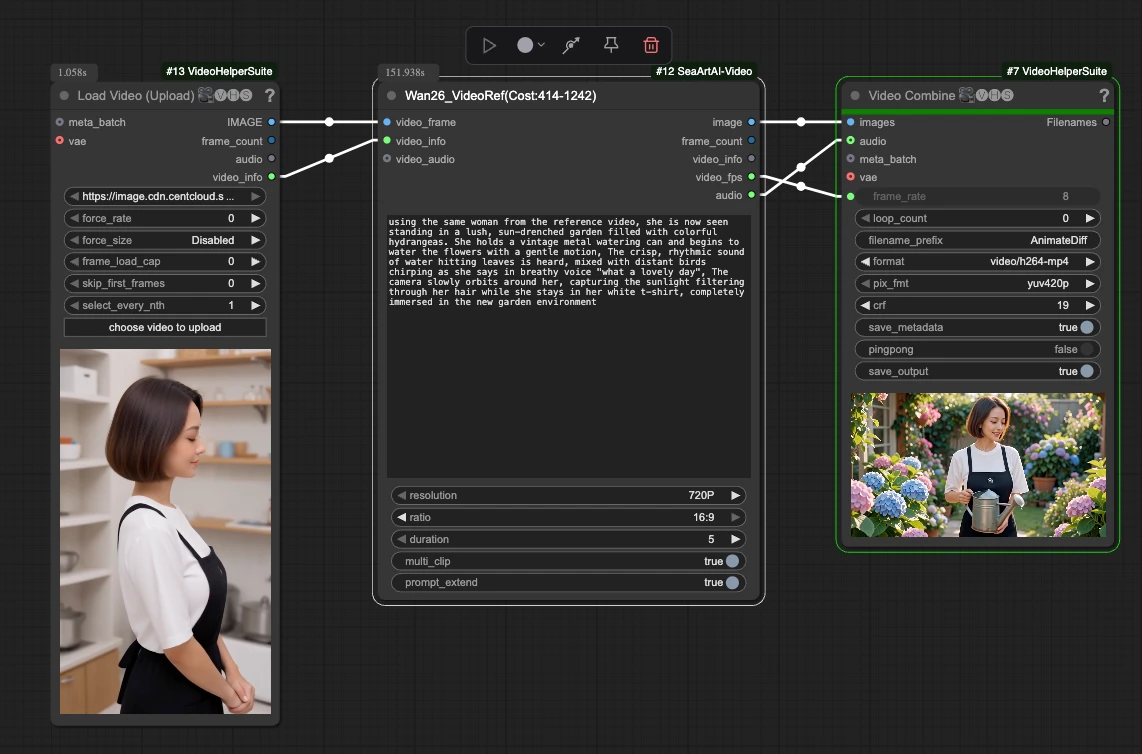
since theres only 1 video reference input in here, so i will give you a better guide is to use a video that show:
- front view
- side view
- face
- upper body
- full body (if you want to generate vertical video)
- also it can copy the audio (it has feature NATIVE AUDIO SYNC)
and you can use this for : human, animals, character, objects, or anything.
basically it will use your VIDEO to generates BRAND NEW VIDEO, its like T2V but with video references.
i will use this video for sample:
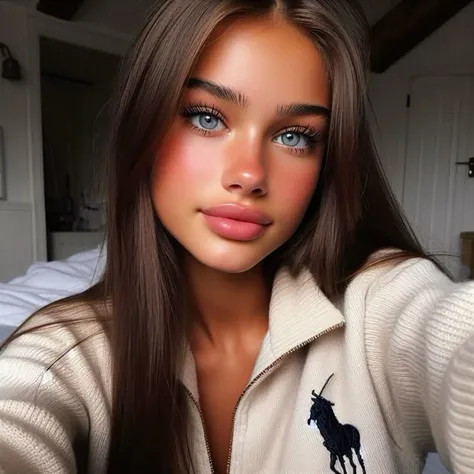
She is Hana by the way ☺️
for the prompt structures, there are 3 schemes you can do (in my opinion):
The "Character Anchor"
This principle focuses on preserving the subject's physical details, but can move the subject to a new background or environment.
sample prompt:
using the same woman from the reference video, she is now seen standing in a lush, sun-drenched garden filled with colorful hydrangeas. She holds a vintage metal watering can and begins to water the flowers with a gentle motion, The crisp, rhythmic sound of water hitting leaves is heard, mixed with distant birds chirping as she says "what a lovely day", The camera slowly orbits around her, capturing the sunlight filtering through her hair while she stays in her white t-shirt, completely immersed in the new garden environment
ah i don't know why the voice turns to Chinese, well i guess because the node doesn't have negative prompts option, LOL, it's totally not my fault... hahaha
The "Material & Atmosphere"
Use this principle if you want your R2V to continue from the reference video, not just focus on the person.
sample prompt:
Continuing in the exact kitchen from the reference, maintaining the wooden shelves and bright studio lighting. The woman now wearing pink shirt and light blue apron, she is now actively chopping fresh vegetables on a wooden cutting board with rhythmic clacking of a knife and the sizzle of a hot pan, synced with her focused expression looking at the camera and saying in english: "my husband will love this". The camera performs a top-down switch to a medium shot, showing steam rising from a pot. Every detail of the environment's material and lighting is preserved, ensuring the kitchen feels identical to the original video.
yeah you must put "english" to get english, lol, and as you can see the kitchen is similar to her initial video.
The "Full Editing"
Use this principle if you want to generate a completely new video, focusing only on the face. You can even change the person's hairstyle and accessories.
sample prompt:
Create a continuous multi-shot scene using the same woman, but now with long pink hair tied in a ponytail, she is wearing a white karate uniform inside a dojo, the camera begins with a slow dolly-in close-up on her face. the shot cuts to a wide shot, revealing the dojo interior and the elderly master, the woman is standing face to face with the elderly master that wears black karate uniform, many students watch attentively from behind as the camera orbits steady-cam movement around the woman and the elderly master to capture the tension. and ends with a dramatic handheld push-in to the woman's face as the woman looks directly at the elderly master with determination and she says in english "I am ready master, are you?".
well its hard to control without negative prompts option, haha.
THE MASTER PROMPTS
check this out and you can copy the list
1. Standard Camera Movement (Basic Axis Control)
Wan 2.6 reads these as direct coordinates (X, Y, Z axis).
Pan: Pan Left, Pan Right, Whip Pan (very fast), Slow Pan.
Tilt: Tilt Up (reveal sky/ceiling), Tilt Down (reveal ground/hands).
Zoom: Slow Zoom In, Zoom Out, Crash Zoom (rapid snap), Step Zoom.
Truck/Crab: Truck Left (move parallel to subject), Truck Right.
Pedestal: Pedestal Up (camera body moves up), Pedestal Down.
Roll: Roll CW (Clockwise), Roll CCW (Counter-Clockwise), Barrel Roll.
Static: Locked-off shot, Tripod static, Zero motion.
Sample Prompt:
"Static shot initially, then sudden Crash Zoom into the pianist's eye, followed by a slow Roll
CW 90 degrees"
2. Enhanced/Advanced Camera Movement (Spatial & Complex)
These commands force the AI to calculate 3D geometry and parallax.
Tracking: Dolly Track, Tracking Shot, Follow Shot, Leading Shot (camera in front).
Rotation: Orbit Left/Right, 360-degree Arc, Spiral Cam.
Focus-Based: Rack Focus (Background to Foreground), Pull Focus, Deep Focus (everything
sharp), Shallow Focus.
Cinematic Rigs: Crane Shot, Boom Up/Down, Jib Arm reveal, SnorriCam (-mounted rig
feel), FPV Drone (acrobatic), Cable Cam (smooth overhead).
Special Techniques: Dolly Zoom (Vertigo effect), Parallax Slide, Dutch Angle (tilted horizon).
Sample Prompt:
"SnorriCam shot locked to the singer's as they stumble forward; the background spins
with a disorienting Parallax effect"
3. Multiple Angle & Composition (Editing & Framing)
Wan 2.6 accepts montage-style prompting.
Shot Sizes: Extreme Close-Up (ECU), Close-Up (CU), Medium Shot (MS), Cowboy Shot,
Wide Shot (WS), Extreme Wide Shot (EWS).
Angles: Worm's Eye View, Bird's Eye View (Top-down), God's Eye View (High altitude), Low
Angle, High Angle, Over-the-Shoulder (OTS).
Transitions/Cuts: Jump Cut, Match Cut (shape to shape), Invisible Cut (whip pan transition),
Fade to Black, Cross Dissolve.
Sample Prompt:
"Start with Extreme Close-Up of a guitar string vibration. Match Cut to a suspension bridge
cable vibrating in the wind (Wide Shot)"
4. Visual Effects for Camera (Optical/Sensor Defects)
Crucial for realism. Wan 2.6 simulates physical lens flaws.
Blur/Distortion: Motion Blur (Shutter 180°), Radial Blur, Gaussian Blur, Bokeh
(Creamy/Swirly/Donut-shaped). Lens Character: Anamorphic Distortion, Barrel Distortion (Fisheye), Pincushion Distortion,
Vignetting, Chromatic Aberration (RGB split at edges).
Sensor Artifacts: Rolling Shutter (wobbly vertical lines), High ISO Noise, Digital compression
artifacts, Moire pattern.
Stability: Handheld Shake, Camera Bob, Gimbal Smooth, Steadicam Float.
Sample Prompt:
"Handheld Shake with heavy Chromatic Aberration on the edges and Anamorphic Lens
Flares hitting the lens horizontally"
5. Visual Effects for Lighting (Atmosphere & Render)
Wan 2.6's raytracing engine logic.
Direction: Backlight, Key Light, Fill Light, Rim Light (Kicker), Top Light.
Quality: Hard Light (sharp shadows), Soft Light (diffused), Specular Highlight (wet skin look),
Rembrandt Lighting (triangle on cheek).
Atmospheric: Volumetric Fog, God Rays, Haze, Dust Motes, Tyndall Effect.
Styles: Noir Lighting, Neon Noir, High Key (bright), Low Key (dark), Bioluminescence,
Practicals (lamps in shot).
Sample Prompt:
"Dark room, single Rim Light outlining the silhouette. Heavy Volumetric Fog catching the
God Rays from a window blind"
6. Visual Effects for Add-on (Post-Production/GFX)
Overlays: Film Grain (8mm/16mm/35mm), Old Film Scratches, Dust & Scratches, VHS Glitch,
Scanlines.
Particles: Embers, Rain Droplets on Lens, Snow, Floating Ash, Confetti.
Light Leaks: Film Burn, Light Leak Overlay, Lens Whacking.
Text/UI: Kinetic Typography, Neon Signage text "[TEXT]"
, Subtitles, HUD Interface.
Sample Prompt:
"Vintage 16mm Film Grain heavy overlay. Occasional Light Leaks (orange/red) burning the
frame edges. Rain Droplets sliding down the lens glass"
7. Audio Prompt for Vocals (Timbre & Performance)
Wan 2.6 Native Audio Sync specific.
Type: Whisper, Speech, Singing, Screaming, Humming, Spoken Word.
Timbre: Husky, Raspy, Gravelly, Airy, Breathy, Crystal Clear, Nasal, Guttural.
Technique: Falsetto, Vocal Fry, Belting, Vibrato, Tremolo, Lazy delivery.
Spatial: Close-mic, Distant vocals, Echoey, Muffled (behind wall).
Sample Prompt:
"Female vocals, Raspy lower register switching to fragile falsetto. Delivery is lazy and
conversational, very close-mic proximity effect"
8. Audio Prompt for Ambient/Music (Score & Texture)
Instruments: Felt Piano (dampened), Prepared Piano, Fingerstyle Guitar, Cello Swell,
Analogue Synth pad. Genre Tags: Ambient Noir, Drone, Lo-Fi, Cinematic Score, Minimalist.
Room Tone: Cathedral Reverb, Small Room Dead acoustic, Hallway Echo, Cave Resonance.
Sample Prompt:
"Felt Piano melody with high damper noise. Background texture of analogue tape
hiss and warm tube saturation"
9. Audio Prompt for Sound Effects (Foley & Physics)
Impacts: Thud, Slap, Punch, Crash, Glass shatter.
Movement: Footsteps (Gravel/Wood/Snow), Clothing Rustle (Leather/Silk/Denim), Wind Howl.
Mechanical: Clock ticking, Camera shutter click, Gun cocking, Engine idle, Pedal squeak.
Sample Prompt:
"Distinct sound of fingers sliding on guitar strings (fret noise), rhythmic soft brush
percussion, and distant thunder rumble"
10. Motion Enhancer Prompt (Time & Physics)
Speed: Slow Motion (50%), Super Slow Mo (10%), Timelapse, Hyperlapse, Speed Ramp
(Slow to Fast).
Physics: Zero Gravity, Fluid Dynamics (liquid simulation), Cloth Simulation (wind on fabric),
Hair Physics.
Consistency: Seamless Loop, Ping-pong loop, Morphing.
Sample Prompt:
"Super Slow Mo (240fps). Raindrops suspended in mid-air. Zero Gravity effect on the
subject's hair floating upwards"
11. Quality Tags (Technical Specs)
Cameras: Arri Alexa LF, RED Komodo, Sony Venice, IMAX 70mm, GoPro Hero.
Lenses: Cooke S4, Leica M, Tilt-Shift Lens, Macro Lens.
Render: Unreal Engine 5.4, Octane Render, Raytracing, Photorealistic, Hyper-realistic.
Color: Technicolor, Bleach Bypass, Sepia, Monochrome, Teal and Orange LUT.
Resolution: 8K UHD, 4K Native, Raw Footage.
Sample Prompt:
"Shot on RED V-Raptor, Macro Lens 100mm, 8K Raw, Color Graded with high contrast noir
LUT, extremely detailed skin texture”