Generating a video is not difficult; what’s difficult is generating the exact segment of video you want in a stable way. Are you still troubled by issues like the style being changed and unstable camera motion? Wan Video 2.6 provides text-to-video, image-to-video, and video reference capabilities. This article will explain it in the easiest way, so you can understand this node.
Wan2.6 Key Features
🎥 Video: Supports continuous generation up to ~15 seconds; supports audio/lip-sync alignment (results depend on the input and the scene); supports multi-shot control from a single prompt, suitable for commercial-grade output.
🎨 Image: More stable style control, better suited for storytelling/storyboard workflows.
🎵 Audio: Generates audio for videos, including not only lip-synced voice, but also background music and sound effects.
`
Wan2.6 Nodes Intro
Node Name | Wan26_Text2Video | Wan26_Img2Video | Wan26_VideoRef | |
Node Interface | Optional | audio: Upload the specified audio | ||
Required | - | image:Upload Image | video_frame: Referrence Video video_info: Video information | |
Node Parameters | prompt | Positive prompt | ||
resolution | Support 720p、1080p | |||
multi_clip | Multi-shot generation default off: single shot | |||
prompt_extend | Whether to enable prompt intelligent optimization | |||
duration | Support 5、10、15 | Support 5、10、15 | Support 5、10 | |
ratio | Support 16:9、9:16、1:1、4:3、3:4 | - | Support 16:9、9:16、1:1、4:3、3:4 | |
audio | true/false whether to add audio | true/false whether to add audio | - | |
Only works without uploading audio。 | - | |||
`
Workflow Preview
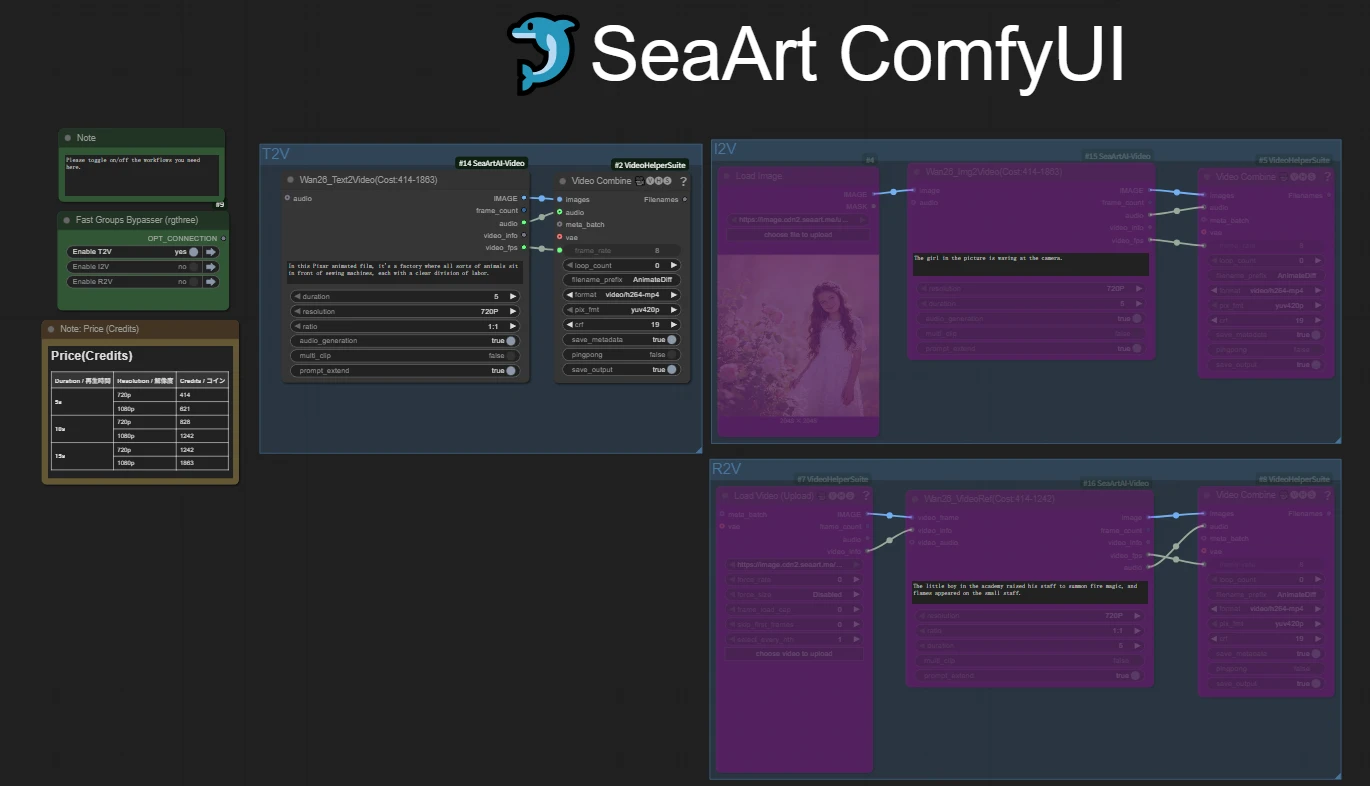
Workflow URL:
Click to Jump
Credits Cost:
Duration \ Resolution | 5s | 10s | 15s |
720p | 414 | 828 | 1242 |
1080p | 621 | 1242 | 1863 |
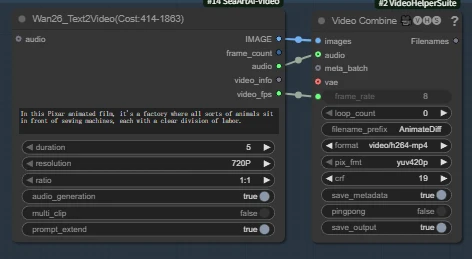
T2V
Connection method:
Showcase (with the same prompt)
Single shot
Multi-shot
third-person chase-style follow shot (low-angle camera 1–2m behind the runner, stable follow): a human explorer sprints through a wet, dim ancient temple corridor as collapsing hazards erupt behind and underfoot, creating intense pressure and urgency. The floor cracks and collapses rapidly behind them, ceiling stones drop, side walls fracture, dust and mist churn in shafts of light; a pillar falls to block the path, a boulder rolls through, and the runner narrowly side-steps, jumps over a gap, and slides under a low beam, with debris flying and thunderous echoes. Final 0.5s: another collapse hits the corridor ahead and the runner barely slips past. Photoreal cinematic look, high-contrast lighting, volumetric fog, realistic physics, moderate motion blur, maximum tension.
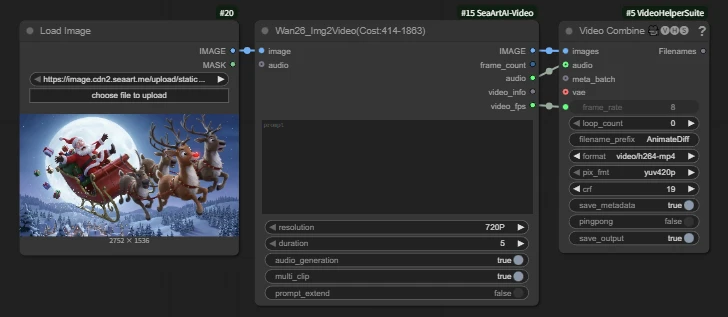
I2V
How to connect
Showcase:
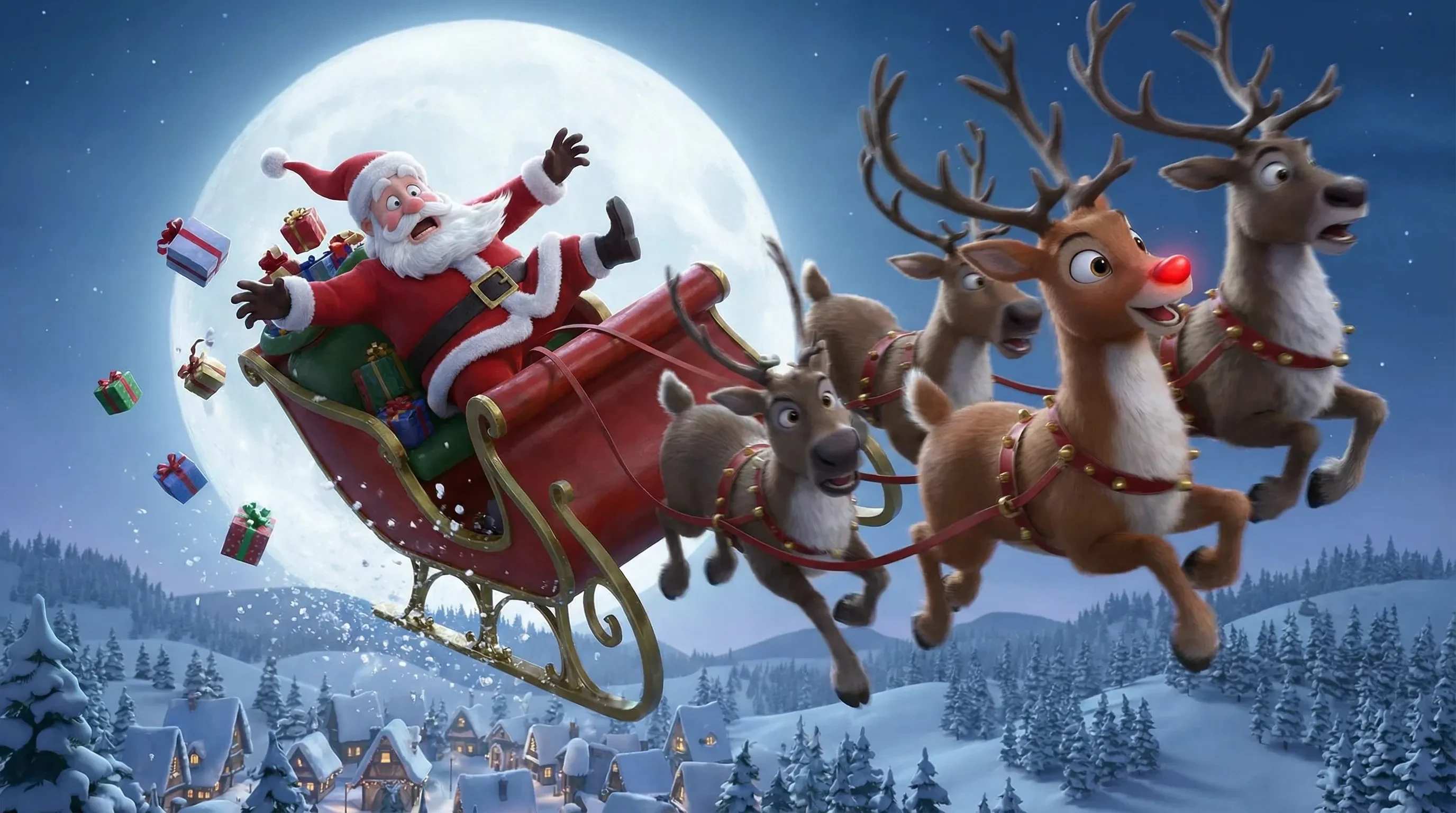
3D Pixar-style animated feature film look. Christmas night, huge full moon, cool blue moonlight. Keep the characters and composition from the reference image. The reindeer suddenly burst into a full-speed sprint, yanking the sleigh forward violently. The sleigh whips and bounces hard with sharp jolts; the reins snap tight and shake rapidly. Santa is being dragged at extreme speed, panicked but cute: wide terrified eyes, mouth open, eyebrows high, cheeks pulled by wind; he clutches the sleigh edge for dear life, body thrown backward then forward by the bumps. Beard and hat pom‑pom stream backward in the strong wind; small gift boxes rattle and hop in the sleigh. High-impact camera: aggressive forward motion, fast push-in, strong parallax, noticeable motion blur, slight camera shake, whip-pan moments, dynamic angle, intense sense of speed.
Single shot
Multi-shot
R2V
How to connect:
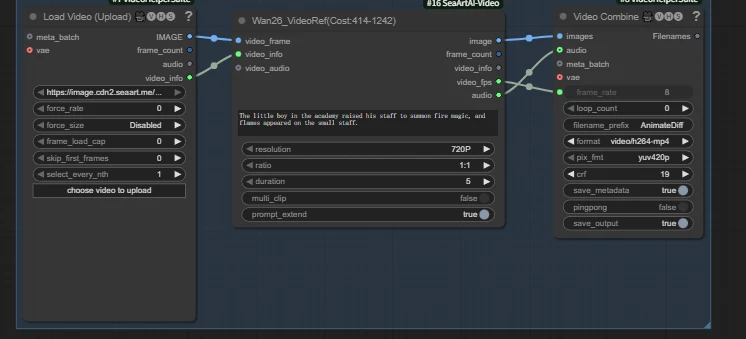
When the original video audio is not connected, the node generates a video with audio by default
Showcase
Reference video:
The little boy in the academy raised his staff to cast fire magic, and flames began to ignite on the small staff. He shouted, "Fire!"
Showcase:
Single shot
Multi-shot
Extended knowledge
Wan2.6 supports generating audio, and correspondingly we also need to add descriptions of the video audio in the prompt— you can describe background music, scene sound effects, and you can also add the character’s spoken lines
When making a talking-head video, please emphasize the person in your frame (subject + expression + tone + lines)
For example: A waiter, holding a menu, smiled and said softly: "What would you like to eat?"
T2V specified audio
When you have a pre-prepared piece of audio: search for the node [LoadAudio], then connect LoadAudio and the Wan26_Text2Video node
The uploaded audio can be human voice, pure music, and natural ambient sound or scene sound effects, etc.
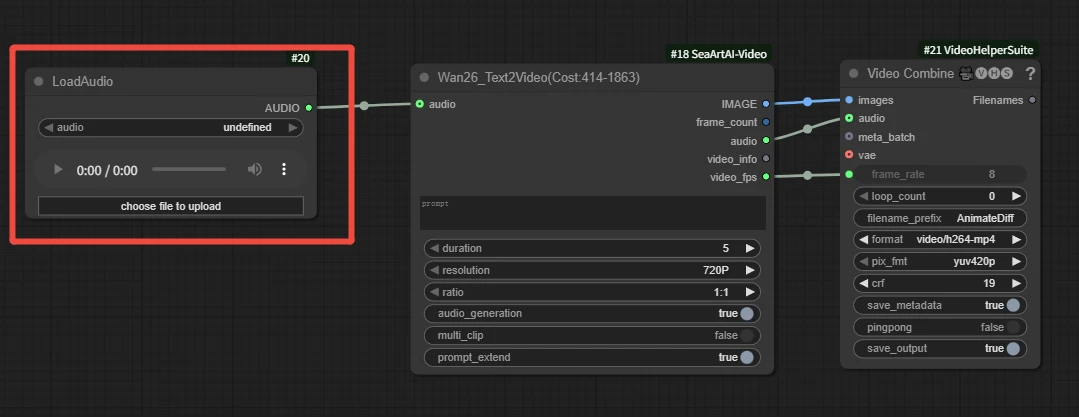
Tips:
● When making character dialogue/talking videos, even if the audio is prepared in advance, the prompt must clearly state: who is speaking and the facial expression, actions, and demeanor while speaking, etc.
● Try to keep the uploaded audio length consistent with the generated video duration
When the audio length is not aligned:
Too long: it will automatically take the generated video duration (5|10|15) seconds, and the excess part of the audio will be discarded.
Too short: if the audio is too short, the missing part will be a silent video
I2V specified audio
This node can use specified audio like t2v
For example: under specified audio, we can use a piece of character audio to make the person in the image do spoken dialogue
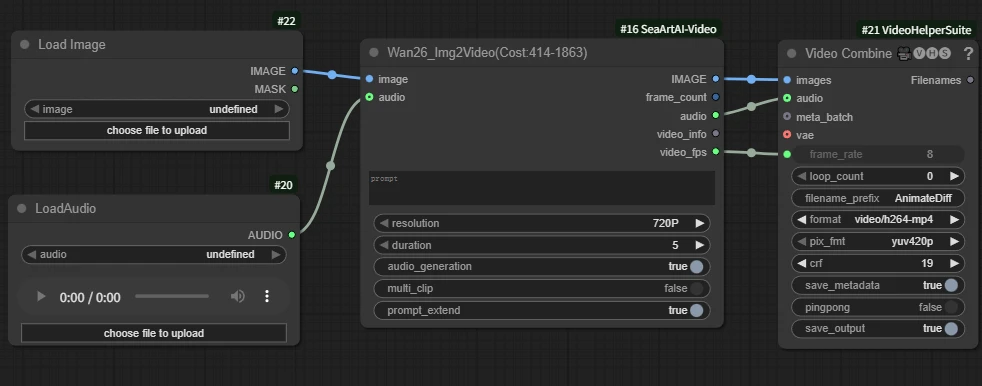
When using specified audio and an image to generate spoken dialogue, you need to emphasize that the person is opening their mouth to speak and their speaking expression, otherwise the spoken dialogue effect will be invalid